What feels like a “low power system” at first can slowly turn into a noticeable monthly expense. That is why understanding home server power consumption is not just technical knowledge—it is practical financial awareness. In this guide, we will break down everything in a simple way so you can understand exactly where energy is used and how to control it.
What Is Home Server Power Consumption?
Home server power consumption is the total amount of electrical energy your system uses while operating. It is usually measured in watts (W) at a given moment or kilowatt-hours (kWh) over time. Unlike a laptop or phone that sleeps often, a home server is usually always active, even if it is doing nothing heavy.
A key concept here is that power usage is not constant. A server may use very little power when idle but increase usage significantly under workload. This dynamic behavior makes understanding consumption more important than simply looking at hardware specifications.
Why Power Consumption Matters More Than You Expect
Many users ignore power usage during setup and only notice it later when electricity bills increase. But beyond cost, there are several other important reasons to pay attention to energy usage.
- Long-term cost control: Even small watt differences matter over months and years.
- Heat management: More power equals more heat, which requires better cooling.
- Hardware lifespan: Higher temperatures can reduce component durability.
- System stability: Efficient systems tend to run more consistently.
A well-optimized server is not just cheaper—it is also more stable and easier to maintain.
How Power Is Actually Used Inside a Server
A home server is made of multiple components, and each one contributes differently to overall energy consumption. Some parts are active constantly, while others only use power when needed.
CPU: The Main Energy Driver
The processor is usually the most dynamic power consumer. When the system is idle, it lowers its frequency and voltage to save energy. But under load—such as streaming, file compression, or running virtual machines—it can consume significantly more power.
RAM: Stable but Always Active
Memory usage is more stable compared to CPU usage. However, higher RAM capacity still increases base power consumption slightly because it remains powered at all times.
Storage Devices: Hidden Continuous Load
Hard drives are one of the most underestimated contributors. Even when not actively reading or writing data, spinning drives consume energy just to stay active. SSDs are more efficient but still contribute to baseline usage.
Motherboard and Chipset
The motherboard handles communication between all components. It does not spike heavily in usage but continuously draws power for system management, USB controllers, and networking functions.
Cooling Fans and Temperature Control
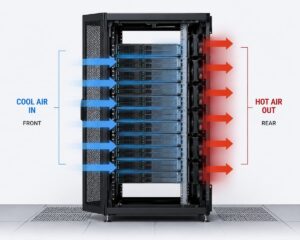
Cooling systems are often ignored in power calculations. However, as temperature rises, fans spin faster and consume more energy. Poor airflow can indirectly increase total consumption significantly.
Understanding Idle vs Active Power in Detail
One of the most important concepts in server efficiency is the difference between idle and active power usage. Most home servers spend 70%–90% of their time in idle or light-load states.
| State | Typical Power Usage | What Happens |
|---|---|---|
| Idle | 20W – 60W | The system is on but doing minimal tasks |
| Light Load | 50W – 100W | File sharing, backups, background services |
| Moderate Load | 100W – 180W | Streaming, multiple users, light virtualization |
| Heavy Load | 180W – 300W+ | Video encoding, multiple VMs, intense processing |
This shows why optimizing idle consumption is often more important than focusing only on peak performance.
How Electricity Consumption Is Calculated
To understand real-world cost, we convert watts into kilowatt-hours (kWh). This helps estimate monthly electricity usage.
Formula: Power (kW) × Time (hours) = Energy (kWh)
For example, a server using 70 watts continuously:
- 70W = 0.07 kW
- 0.07 × 24 hours = 1.68 kWh per day
- 1.68 × 30 days = 50.4 kWh per month
Now multiply by your local electricity rate to estimate monthly cost. This simple method helps you understand real operational expenses.
Power Supply Efficiency: The Hidden Factor
One commonly overlooked detail is PSU (Power Supply Unit) efficiency. A power supply does not convert electricity perfectly. Some energy is lost as heat during conversion. For example, a system drawing 100 watts from components might actually pull 120 watts from the wall depending on PSU efficiency. Higher efficiency power supplies waste less energy, meaning lower electricity bills and less heat generation.
Virtualization and Workload Impact
Modern home servers often run virtual machines or container systems. These workloads can significantly affect power usage depending on how they are configured.
- Multiple virtual machines increase CPU usage
- Background services can prevent idle states
- Improper resource allocation causes constant loads.
Efficient workload management ensures that resources are only used when needed, keeping power consumption under control.
Environmental Factors That Influence Power Usage
Power consumption is not only about hardware. The environment around your server also plays a role.
Room Temperature
Higher room temperatures force cooling fans to work harder, increasing energy usage indirectly.
Dust and Airflow
Dust buildup reduces cooling efficiency, causing components to heat up and consume more power for cooling.
Ventilation Setup
Poor ventilation traps heat inside, making the system work harder than necessary.
Common Misunderstandings About Server Power Usage
There are several myths that often lead users to incorrect assumptions about energy usage.
Myth 1: “If the server is idle, it uses almost no power.”
Even idle systems still consume baseline power for memory, motherboard, and background services.
Myth 2: “Small servers don’t affect electricity bills”
Even a 40–60 watt system running continuously adds up over a year.
Myth 3: “Upgrading hardware always increases power usage”
Newer hardware is often more efficient, meaning better performance per watt.
Practical Ways to Improve Energy Efficiency
Optimizing a home server does not require complex changes. Small adjustments can make a big difference.
- Enable CPU power-saving features
- Reduce unnecessary background services
- Schedule heavy tasks during specific hours
- Keep system clean and dust-free
- Ensure proper airflow and ventilation
- Shut down unused components or drives
These small steps can reduce both electricity costs and heat generation.
Real-World Example: Monthly Cost Breakdown
Let’s take a realistic example of a mid-range home server.
- Average consumption: 65 watts
- Daily usage: 1.56 kWh
- Monthly usage: 46.8 kWh
If electricity costs 0.25 USD per kWh:
46.8 × 0.25 = 11.7 USD per month
Over a year, this becomes more than 140 USD for a single low-power system.
Balancing Performance and Energy Efficiency
The goal of a home server is not to minimize power usage at all costs. Instead, it is about finding the right balance between performance and efficiency.
A system that is too weak may save electricity but fail to handle workloads. A system that is too powerful may waste energy. The best setup is one that matches your actual usage patterns while staying efficient during idle time.
Simple Checklist for a More Efficient Home Server
- Check idle power usage regularly
- Monitor temperature levels
- Reduce unnecessary services
- Keep hardware clean
- Review workload scheduling
Conclusion
Understanding home server power consumption helps you make better decisions about hardware, configuration, and long-term usage. Most energy is not wasted during peak performance but during idle time, which makes optimization even more important.
By learning how each component behaves, measuring actual usage, and applying simple efficiency techniques, you can significantly reduce costs while maintaining strong performance. A well-balanced server is not only cheaper to run but also more reliable and long-lasting.