What Is Zero Trust Remote Access?
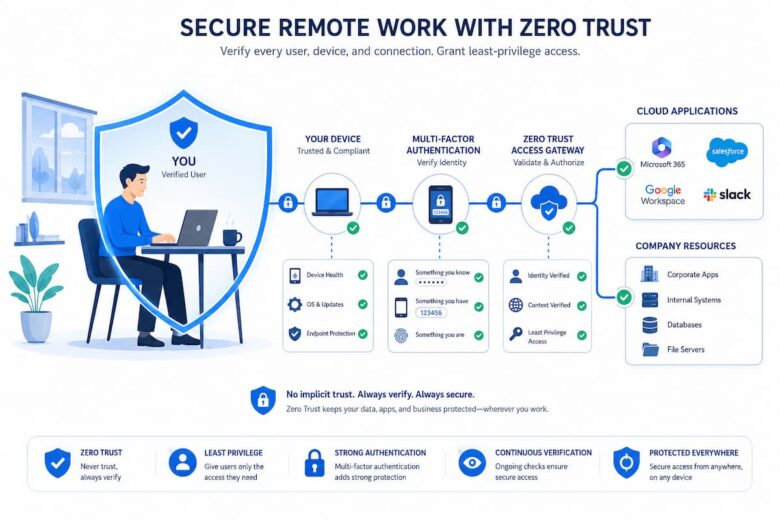
Zero Trust Remote Access is a modern security approach that checks every user, device, and connection before allowing access to company resources. Instead of assuming someone is trustworthy because they are connected to the company network, every request must prove its identity. Think of it like entering a secure office building. Even if you’ve entered through the main door, you may still need a key card to enter different rooms. Each door checks whether you have permission before allowing access. Zero Trust works in a similar way by continuously verifying users instead of granting unlimited access after one login.
This approach is becoming increasingly important because today’s workplaces rely on cloud applications, remote employees, freelancers, and contractors. People often work from different cities or countries, making traditional security methods less effective.
Quick Fact:
Zero Trust does not mean trusting nobody. It means verifying every access request before granting permission, regardless of where it comes from.
Simple Example
Imagine Sarah works for a company from home. She wants to open an internal financial application. Instead of simply checking her password once, the system verifies several things:
- Is Sarah using the correct password?
- Has she completed multi-factor authentication?
- Is her laptop secure and updated?
- Is she accessing only the applications she needs?
Only after these checks are completed does the system allow access.
Why Traditional Remote Access Is No Longer Enough
For many years, businesses relied on virtual private networks (VPNs) to let employees connect securely from outside the office. While VPNs still provide encrypted connections, they were designed for a different era when most employees worked from company offices using managed computers.
Today’s workplaces are much more flexible. Employees may use cloud software, mobile devices, home internet connections, and public Wi-Fi networks. Cyber threats have also become more sophisticated, making older security models less reliable.
| Traditional Approach | Modern Challenges |
|---|---|
| Trust users after login | Attackers may steal login credentials |
| Protect network perimeter | Cloud services exist outside the perimeter |
| Office-based workforce | Remote and hybrid work |
| Few connected devices | Many personal and mobile devices |
If a hacker gains access through a stolen password, traditional systems may allow broad access to company resources. Zero Trust reduces this risk by limiting permissions and continuously checking every connection.
The Core Principle Behind Zero Trust
The philosophy behind Zero Trust is surprisingly simple:
“Never Trust, Always Verify.”
Every user, device, application, and network connection must prove it should be trusted before receiving access. Verification doesn’t happen only during login—it continues throughout the session. If something changes, such as a device becoming infected with malware or a user suddenly logging in from an unusual location, the system can request additional verification or block access completely.
Main Principles of Zero Trust
- Verify every user identity.
- Authenticate every device.
- Grant the minimum level of access required.
- Continuously monitor activity.
- Assume breaches are possible and limit their impact.
Expert Tip: Limiting user permissions is one of the simplest ways to reduce damage if an account is compromised.
Instead of giving employees access to everything inside the company network, Zero Trust only provides access to the specific applications or files needed for their role.
How Zero Trust Remote Access Works
Although the technology behind Zero Trust may sound complex, the overall process follows a straightforward series of checks whenever someone attempts to access company resources.
Step 1: Identity Verification
The user signs in using a username and password. Most organizations also require multi-factor authentication, such as a code sent to a phone or generated by an authentication app.
Step 2: Device Verification
The system checks whether the device meets security requirements. It may verify that antivirus software is active, operating system updates are installed, and the device follows company security policies.
Step 3: Context Evaluation
Additional information is evaluated before granting access. This can include:
- User location
- Time of access
- Device health
- Risk level
- Requested application
Step 4: Limited Access Granted
Instead of giving access to the entire company network, the user receives permission only for the specific application or resource required.
Step 5: Continuous Monitoring
Security monitoring continues after login. If unusual behavior is detected, such as downloading large amounts of sensitive data or connecting from an unexpected country, additional verification may be required or the session may be ended automatically.
Example: If an employee normally logs in from New York but suddenly attempts to access confidential systems from another country just minutes later, the Zero Trust system may temporarily block access until the identity is confirmed.
Key Benefits of Zero Trust Remote Access
Organizations of all sizes are moving toward Zero Trust because it helps protect sensitive information while supporting modern ways of working. Instead of relying on a single security check during login, Zero Trust continuously verifies users and devices. This creates multiple layers of protection that reduce the chances of unauthorized access.
The benefits go beyond cybersecurity. Employees can work remotely with confidence, IT teams gain better visibility into network activity, and businesses can respond more quickly to changing security risks.
Main Benefits
- Reduces the risk of unauthorized access.
- Protects cloud applications and remote workers.
- Limits damage if an account is compromised.
- Improves visibility into user activity.
- Supports hybrid and remote work environments.
- Helps organizations meet security compliance requirements.
- Allows more flexible access without sacrificing security.
| Benefit | Why It Matters |
|---|---|
| Continuous verification | Reduces the chance of attackers moving freely. |
| Least-privilege access | Users only access what they need. |
| Better monitoring | Suspicious activity is detected more quickly. |
| Cloud-ready security | Protects applications hosted outside the office. |
| Improved flexibility | Employees can work securely from different locations. |
Important Features of Zero Trust Remote Access
Although different security platforms use different technologies, most Zero Trust solutions include several common features. These work together to verify users, protect devices, and reduce security risks throughout every session.
Multi-Factor Authentication (MFA)
MFA requires users to verify their identity using more than one method, such as a password plus a temporary code or authentication app. Even if someone steals a password, logging in becomes much more difficult.
Device Verification
Before allowing access, the system checks whether the device meets security requirements. This may include checking operating system updates, antivirus software, encryption, or company security policies.
Least-Privilege Access
Users receive access only to the applications, files, and services required for their specific job responsibilities. This greatly limits unnecessary exposure.
Continuous Monitoring
Unlike older security models, Zero Trust continues evaluating user activity after login. If risky behavior is detected, additional verification or automatic restrictions may be applied.
| Feature | Purpose |
|---|---|
| Multi-Factor Authentication | Confirms user identity. |
| Device Health Checks | Ensures secure devices connect. |
| Access Policies | Controls who can access specific resources. |
| Continuous Monitoring | Detects suspicious behavior quickly. |
| Risk-Based Authentication | Adjusts security based on current risk. |
Zero Trust Remote Access vs. Traditional VPN
Virtual Private Networks (VPNs) have protected remote connections for many years. They create an encrypted tunnel between a user’s device and the company network. While this remains valuable, VPNs generally focus on securing the connection itself rather than continuously evaluating trust. Zero Trust takes a different approach. Instead of giving broad network access after a successful login, it verifies users, devices, and context before allowing access to specific resources.
| Feature | Traditional VPN | Zero Trust Remote Access |
|---|---|---|
| User Verification | Mainly during login | Continuous verification |
| Access Scope | Often broad network access | Application-specific access |
| Device Health Checks | Limited | Commonly included |
| Risk Evaluation | Minimal | Continuous |
| Cloud Compatibility | Moderate | Designed for cloud environments |
| Security Approach | Trust after authentication | Always verify |
Can They Work Together?
Yes. Some organizations continue using VPNs while gradually introducing Zero Trust principles. Over time, they reduce dependence on traditional VPN access by securing individual applications instead of entire networks.
How Organizations Implement Zero Trust Remote Access
Adopting Zero Trust is usually a gradual process rather than a single project. Most organizations improve security step by step while minimizing disruption for employees.
Step 1: Identify Critical Resources
The first task is identifying sensitive systems, applications, and data that require stronger protection. Examples include customer databases, financial systems, and internal business applications.
Step 2: Strengthen Identity Management
Organizations introduce stronger authentication methods, especially multi-factor authentication, to improve confidence that users are who they claim to be.
Step 3: Verify Device Security
Devices are checked before connecting. Systems that fail security requirements may receive limited access or be blocked until they meet company standards.
Step 4: Apply Least-Privilege Access
Instead of giving employees broad access to company resources, permissions are limited according to each person’s role and responsibilities.
Step 5: Monitor Continuously
Security tools analyze activity throughout each session. Automated alerts help administrators respond quickly to unusual behavior.
| Implementation Stage | Main Goal |
|---|---|
| Identify Resources | Protect important systems first. |
| Identity Verification | Confirm every user. |
| Device Validation | Allow only trusted devices. |
| Least Privilege | Reduce unnecessary access. |
| Continuous Monitoring | Detect threats quickly. |
Common Mistakes to Avoid
Although Zero Trust strengthens security, poor planning can reduce its effectiveness. Understanding common mistakes helps organizations avoid unnecessary problems during implementation.
Common Mistakes
- Assuming MFA alone is Zero Trust.
- Giving users broader permissions than necessary.
- Ignoring device security.
- Failing to update access policies regularly.
- Not monitoring user activity after login.
- Overlooking employee security training.
- Applying identical policies to every user regardless of role.
Technology alone cannot solve every security problem. Employees should also understand phishing attacks, password security, safe browsing habits, and the importance of reporting suspicious activity.
Best Practices for Zero Trust Remote Access
Whether you are managing a small business or a large organization, following proven security practices can make Zero Trust Remote Access more effective. These practices help reduce security risks while keeping the user experience as smooth as possible.
Follow the Principle of Least Privilege
Only provide employees with access to the applications and data they need to perform their jobs. Avoid giving broad permissions simply because they might be useful later. Regularly review access rights, especially when employees change roles or leave the organization.
Require Multi-Factor Authentication Everywhere
Passwords alone are no longer enough to protect sensitive systems. Enabling multi-factor authentication (MFA) for every remote login adds an extra layer of protection, even if passwords are compromised.
Keep Devices Secure
Encourage employees to install operating system updates, security patches, and antivirus software promptly. Devices that fail basic security checks should not be allowed to access sensitive company resources.
Monitor User Activity Continuously
Review login attempts, unusual locations, and unexpected access patterns. Automated monitoring tools can quickly identify suspicious behavior and notify administrators before small issues become serious incidents.
Tip: Review user permissions at least every few months. Removing outdated accounts and unnecessary access rights is one of the simplest ways to strengthen security.
The Future of Zero Trust Remote Access
The way people work continues to change. Remote work, hybrid offices, cloud computing, and mobile devices are now common in many industries. As these trends continue, organizations need security approaches that protect users without restricting productivity. Zero Trust is expected to play an even bigger role in the future because it focuses on protecting identities rather than relying only on network boundaries. Security systems are also becoming smarter by using artificial intelligence and machine learning to detect unusual behavior more quickly.
Future Zero Trust solutions may automatically evaluate device health, recognize suspicious login patterns, and adjust security requirements based on real-time risk. Employees may notice fewer interruptions because security decisions will become more accurate and adaptive. Although technology will continue evolving, the basic principle will remain the same: verify every request, grant only the necessary level of access, and continuously monitor activity to reduce security risks.
Looking Ahead: Zero Trust is no longer viewed as an optional security upgrade. For many organizations adopting cloud services and remote work, it is becoming part of their long-term cybersecurity strategy.
Conclusion
Zero Trust Remote Access provides a practical way to secure today’s modern workplace. Instead of assuming users are trustworthy after a single login, it continuously verifies identities, evaluates devices, limits permissions, and monitors activity throughout every session. This approach helps organizations reduce cyber risks while supporting flexible work environments. Employees can safely access the resources they need without exposing the entire network to unnecessary threats.
Whether you manage a small business or simply want to understand modern cybersecurity concepts, learning the basics of Zero Trust is a valuable step. As remote work and cloud services continue to grow, understanding this security model will become increasingly useful for both IT professionals and everyday users.
FAQs
1. Is Zero Trust Remote Access only for large companies?
No. Businesses of all sizes can benefit from Zero Trust principles. Even small organizations store valuable information such as customer records, financial data, and employee information. Using stronger identity verification and limiting access helps reduce security risks regardless of company size.
2. Does Zero Trust replace VPNs completely?
Not always. Some organizations continue using VPNs while gradually introducing Zero Trust controls. Others eventually replace traditional VPN access with application-specific access based on user identity and device security. The right approach depends on business needs and existing infrastructure.
3. What is the difference between Zero Trust and traditional network security?
Traditional security often assumes users inside the company network can be trusted after authentication. Zero Trust removes that assumption by continuously verifying users, devices, and access requests before allowing access to specific resources.
4. Why is multi-factor authentication important in Zero Trust?
Passwords can be stolen through phishing attacks or data breaches. Multi-factor authentication requires additional verification, making it much harder for attackers to access company systems even if they know the correct password.
5. Can employees still work remotely with Zero Trust?
Yes. In fact, Zero Trust is designed to support secure remote work. Employees can safely access approved applications from different locations while organizations maintain better control over security and access permissions.
References
- National Institute of Standards and Technology (NIST) – SP 800-207: Zero Trust Architecture — https://csrc.nist.gov/publications/detail/sp/800-207/final
- Cybersecurity and Infrastructure Security Agency (CISA) — https://www.cisa.gov/zero-trust-maturity-model
- Microsoft Learn – Zero Trust Guidance Center — https://learn.microsoft.com/security/zero-trust/
- Cloud Security Alliance (CSA) — https://cloudsecurityalliance.org/
- Google BeyondCorp — https://cloud.google.com/beyondcorp
- National Cyber Security Centre (NCSC UK) — https://www.ncsc.gov.uk/
- Wi-Fi Alliance — https://www.wi-fi.org/