What Are Enterprise-Grade Hard Drives Designed for?
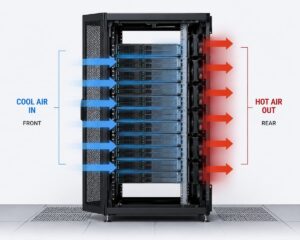
Enterprise-grade storage drives are designed for storage systems that need to operate 24/7. These drives are widely used in data centers, cloud storage systems, and commercial servers, where thousands of users access their data simultaneously. These extreme conditions force manufacturers to prioritize durability and stability in the development of enterprise-grade hard drives. They are continuously exposed to high loads and vibrations (such as multiple drives in a rack) and prolonged stress tests that most home users never encounter. In short, commercial enterprise-grade drives are designed to withstand heavy loads, not for daily use.
Consumer Hard Drives and Their Benefits
Most consumers use consumer hard drives in laptops, desktops, and simple external storage devices. These drives handle everyday tasks, such as browsing the internet, gaming, media storage, and simple file processing.
Consumer storage drives are not designed to operate under high load 24/7, like hard drives for the business market. They are designed for short periods of activity and long periods of inactivity or shutdown. This design makes them quieter, cooler, and more energy-efficient. Consumer hard drives are more than sufficient for the average user. Problems only arise with server loads.
Key Differences Between Enterprise and Consumer Drives
| Feature | Enterprise Drives | Consumer Drives |
|---|---|---|
| Intended Use | 24/7 high-load server environments | Daily personal or light office use |
| Durability | Very high endurance under constant load | Moderate endurance |
| Performance Stability | Stable even under heavy simultaneous usage | May slow under long, heavy workloads |
| Noise Level | Louder due to stronger mechanical design | Generally quiet |
| Heat Output | Higher heat generation | Lower heat generation |
| Power Consumption | Higher usage | Energy-efficient |
| Cost | Expensive | Budget-friendly |
Why Reliability Is the Biggest Reason People Consider Enterprise Drives
Reliability is the number one reason people look at corporate drives. When a drive breaks, it’s not only the cost of replacement. The underlying problem is data loss, downtime, and recovery stress. Enterprise drives are built to be more resistant to failure while under duress. They have more robust components, superior error correction systems, and firmware that can manage continuous workloads. In these kinds of contexts, this can make a real difference, as data is continuously accessed.
But generally, the burden in a home server setup is a lot lighter. Streaming media, keeping backups, or sharing files seldom pushes a disk to its limitations. This is where the choice gets less clear.
Performance: How Changes Actually Are In Real Life
It’s a common misconception that enterprise drives are faster than consumer drives. This is not exactly true. The difference is typically not at top speed but in consistency under heavy load.
For instance, corporate drives offer consistent performance in a multi-user environment (with many users accessing files) or in an environment where big data transfers are constantly occurring. Consumer drives can, however, decelerate somewhat under persistent demand.
For a normal home server with one or two users, this difference is usually not visible in everyday use.
Noise, Heat, and Power: The Real World Tradeoffs
One of the first things people notice when they migrate to enterprise drives is the loudness. These drives are also mechanically more robust and often spin faster, which makes more sound. Such noise might be distracting in a peaceful residential atmosphere, especially in bedrooms or living rooms.
Heat is a factor, too. Enterprise drives are designed to run continuously, which generates higher heat. That makes sufficient ventilation more important, especially if you have numerous drives in one system.
The power consumption is also slightly higher. That may not be a big deal for a single drive, but it can build up in multi-drive systems running 24/7.
Cost vs Value: The Single Most Important Decision Factor
Cost is often the major hurdle when looking into enterprise drives. They are far more expensive than consumer drives. Sometimes over double for the same amount of storage.
The real question is whether the reliability is worth the extra money. If the data on the server is replaceable or backed up elsewhere, it may not be worth spending more. But if the data is crucial—corporate files, important archives, or irreplaceable media—the cost is more justifiable.
Home Servers: Real-World Scenarios Explained
1. Streaming Media Server
One of the most typical home server setups is a media server. It allows you to stream movies, music, and videos to devices. In this scenario the burden is primarily read-only and not very heavy. Usually consumer drives are more than enough.
2. File Storage Server and Backup
Backup servers contain copies of critical files. Reliability is key here, but RAID systems, cloud backups, etc. typically safeguard you even without an enterprise drive. A lot of users do use consumer drives successfully for these purposes.
3. Small Business / work from home server
When a home server supports business activities, uptime matters more. In this case, corporate drives are more beneficial because they have frequent file access, several users, and are constantly active.
4. Experimental / Learning Setup
If you are a beginner learning about servers, networking, or storage systems, consumer drives are your best bet. They are cheap and lessen the danger if something goes wrong in experiments.
Enterprise Drive Myths
Another myth is that enterprise drives will never fail. That doesn’t seem right. “Mechanical drives have a limited lifespan. Enterprise drives are designed better to reduce early failure under stress.
Another fallacy is that they are always speedier. In truth, the type of workload and system setup have a larger effect on speed than the drive category itself.
Another misunderstanding is that they will instantaneously enhance performance for all home servers. In fact many home setups don’t even have the resources to see a difference.
When Enterprise Drives Actually Make Sense
Enterprise drives are not necessary for every home server. They become useful when:
- The system runs 24/7 without shutdown
- Multiple users access data frequently
- The workload is heavy and continuous
- Data loss would be costly or difficult to recover from
- The setup uses RAID or multi-drive storage systems
A Practical Way to Make the Right Decision
Instead of focusing only on “enterprise vs. consumer,” it is better to think about usage patterns. Ask simple questions:
- How important is my data?
- How many hours will the server run daily?
- How many users will access it at the same time?
- Do I have backups in place?
The answers to these questions usually make the decision clear without needing technical confusion.
Conclusion
Enterprise drives are powerful, reliable, and designed for demanding environments, but they are not automatically necessary for home servers. Most home users will not fully utilize their advantages while still paying higher costs and dealing with more noise and heat.
Consumer drives remain a practical and efficient choice for everyday home server setups. Enterprise drives make sense only when the system becomes mission-critical or heavily loaded. The best decision is not about choosing the strongest option but choosing the right tool for the actual workload.