Building or upgrading a server can seem hard, especially the first time you do it. Beginners usually focus on choosing the processor, memory, or storage, but they often forget one of the most critical components: the server motherboard. All main hardware components link to the motherboard; thus, picking the appropriate one can make a big impact on performance, stability, and future upgrades.
A server motherboard is made to run all the time, 24 hours a day, 7 days a week, with higher dependability and support for enterprise technology. It is not the same as a desktop motherboard. If you’re building a home media server, file storage server, virtualization machine, or small business server, knowing the basics of server motherboards can help you make a better decision. This beginner’s guide covers everything you need to know before buying a server motherboard, including key features, compatibility, expansion, and real-world buying considerations.
Why Motherboards Are Important in a Server
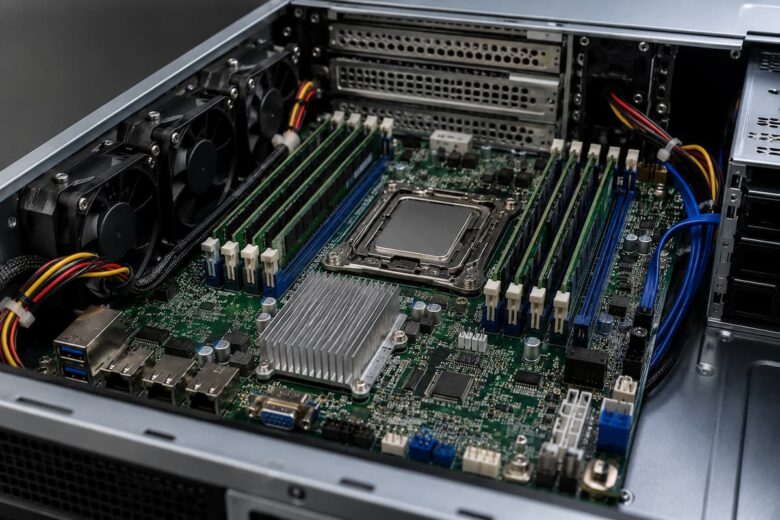
The motherboard is like the backbone of your server. Every main component needs to be considered: processor, RAM, storage devices, network adapters, and expansion cards. A good motherboard makes sure all these parts work well together and keeps them running reliably for a long time to come.
Servers are often running 24/7, without stopping. Thus, server motherboards are designed with stability and endurance in mind. They tend to have better power supply systems, better cooling support, more expansion potential, and features that make remote management easier. Selecting the correct motherboard from the get-go also eliminates the risk of pricey upgrades in the future. You want a motherboard that has enough expansion slots and storage connections so you may expand as your demands change.
Desktop Motherboards vs. Server Motherboards
Many begin if they can use a regular desktop motherboard that can be used for a server. While it is technically possible for some simple projects, there are important differences between desktop and server hardware.
| Feature | Desktop Motherboard | Server Motherboard |
|---|---|---|
| Designed For | Personal computers | Continuous server workloads |
| Operating Time | Several hours daily | 24/7 operation |
| Memory Support | Standard memory | Often supports ECC memory |
| Expansion | Limited | Usually offers more expansion options |
| Remote Management | Rare | Common on many models |
| Reliability | General computing | Built for stability and uptime |
For learning purposes or light home use, a desktop motherboard may be sufficient. However, if your server will store important files, host multiple services, or remain powered on continuously, a dedicated server motherboard is usually a more reliable choice.
Know Your Server’s Purpose Before Buying
Before you start comparing motherboard specs, please take a moment to clarify what your server will actually do. “Different workloads require different hardware capabilities. For example, a home file server will mostly need reliable storage support and a solid network link. A virtualization server can need extra memory slots and numerous processing cores. Fast storage interfaces are essential for a media streaming server. Storage expansion is beneficial for a backup server.
Answering a few simple questions will help restrict your choices:
- How many users will use the server?
- Will it keep running?
- Do you anticipate a subsequent memory upgrade?
- How many storage drives will be installed?
- Require more than a single network connection?
- Any expansion cards later?
If you know the answers before you go shopping, you won’t end up paying for things you may never use and you’ll make sure you don’t miss out on capabilities that might be vital to you later.
First comes CPU compatibility
One of the most significant purchase considerations is CPU compatibility, as motherboards support only particular families of processors and socket types. Even processors from the same manufacturer may have entirely different sockets. In addition to the socket, check the motherboard’s supported CPU generation. Some modern CPUs may not work with older boards without firmware updates. Manufacturers routinely release upgraded chipsets.
Avoid installation problems later by checking the compatibility list from your motherboard maker. A few minutes of compatibility checking can save you time and money on your build. Furthermore, think about future updates. If the motherboard supports higher-speed processors on the same platform, you can get more life out of your server.
Understanding Memory Support
Memory plays a major role in server performance, especially when multiple applications run at the same time. Before purchasing a server motherboard, check how many memory slots it offers and the maximum amount of RAM it supports. Even if you only need a small amount of memory today, choosing a motherboard with extra slots allows you to upgrade later without replacing existing modules.
Many server motherboards support Error-Correcting Code (ECC) memory. ECC RAM can automatically detect and correct certain memory errors before they affect the system. This feature improves reliability and is especially useful for servers that store important files or run continuously. While not every home server requires ECC memory, understanding its benefits helps you make a more informed decision. Also pay attention to the supported memory speed and generation. Using compatible memory ensures the system performs efficiently and avoids unnecessary compatibility problems.
Storage Connectivity and Expansion Options
Your server’s storage needs will likely grow over time. Whether you plan to store documents, photos, videos, backups, or virtual machines, the motherboard should provide enough storage connections for future expansion.
Look for motherboards that include multiple storage interfaces. Having several available ports allows you to install additional drives without needing extra expansion cards.
Common Storage Connections
| Connection Type | Purpose | Typical Use |
|---|---|---|
| SATA | Connects HDDs and SSDs | General storage |
| M.2 | Supports high-speed SSDs | Operating system and applications |
| U.2 (Some Models) | Enterprise SSD support | Professional storage systems |
| PCIe Expansion | Add storage controller cards | Future upgrades |
If your goal is long-term flexibility, choose a motherboard with more storage connections than you currently need. This small decision can make future upgrades much easier.
Expansion Slots for Future Growth
One of the biggest advantages of a server motherboard is its ability to grow with your needs. Expansion slots allow you to add new hardware instead of replacing the entire system.
For example, you may eventually want to install the following:
- Additional network interface cards (NICs)
- RAID controller cards
- High-speed storage controllers
- Capture cards for media servers
- Graphics cards for specialized workloads
Even if you do not need these upgrades today, having available PCI Express (PCIe) slots gives your server greater flexibility in the future.
Network Connectivity Is More Important Than You Think
Every server depends on a reliable network connection. Since clients access files and services through the network, the motherboard’s networking capabilities deserve careful attention. Most modern server motherboards include at least one built-in Ethernet port, while many provide two or more ports for improved performance and redundancy.
When comparing motherboards, consider features such as the following:
- Number of Ethernet ports
- Supported network speed
- Network controller quality
- Support for future network upgrades
For small home servers, a single network port may be sufficient. However, business environments or virtualization servers often benefit from multiple network interfaces that can separate workloads or improve availability.
Cooling and Power Delivery Features
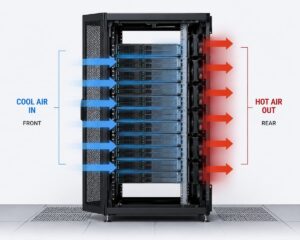
Servers often run 24/7, producing heat for extended periods of time. A motherboard with strong cooling support will help keep performance consistent and can also increase the life of components attached to it. Look for features such as many fan headers, well-constructed heatsinks, and efficient power delivery components. These features assist in keeping CPU temps under check during high workloads.
Power supply is just as vital. It relieves stress on the processor and memory by providing stable voltage management, especially during long hours of intense workloads on the server. Good airflow inside the server case also collaborates with motherboard cooling functions. Choosing the right components and keeping clean air flow can increase long-term reliability.
Remote Management Capabilities
Remote management capability separates many server motherboards from their desktop counterparts. It lets admins monitor, debug, or restart the server without being physically there. Remote management is a time saver for companies who have to take care of servers in a different room or building. These functionalities can be useful to home users as well, if the server is located elsewhere.
Although beginners may not require complex management capabilities right away, choosing a motherboard that has them can offer more flexibility as your technical competence and server needs expand.
Common Mistakes When Selecting a Server Motherboard
It’s easy to focus too much on price or a single spec when you’re a first-time builder, but server motherboards require a more balanced approach. A simple mistake at the start can affect performance or future upgrading opportunities. Knowing these typical mistakes will help you prevent expensive complications.
One error too many people make is buying a motherboard without checking for long-term compatibility. Some consumers get a board that only supports the older processors or limited RAM, so it limits what they can upgrade to later on. Another frequent problem is not considering the requirement for expansion and buying a board that has insufficient PCIe slots or storage connections. Sometimes beginners also underestimate the cooling requirements. Servers are running all the time; therefore, lack of adequate cooling support can cause overheating, lower performance, or hardware failure over time.
Common Mistakes to Avoid
- Not double-testing compatibility of CPU socket
- Ignoring ECC memory support when dependability is required
- Too few RAM slots to choose from
- Underestimating storage growth requirements
- Overcoming network port limits
- Buying on price alone, not on features
How To Match A Motherboard To Your Server Goals
The easiest strategy to choose a server motherboard is to match it to your real use case. So don’t only look at the specs; think about how your server will perform in the real world. For instance, you don’t need a fancy expansion feature set for a simple home file server, but you do need solid storage connections and stable network performance. On the other hand, a virtualization server requires more RAM, support for many CPU cores, and several extension options.
A video streaming server needs high-performance storage interfaces and consistent network throughput. A backup server should care about storage scalability and dependability, not speed. Matching your choice of motherboard to your workload means you don’t pay too much and you get decent performance from your system.
Simple Comparison Checklist Before Buying
Before finalizing your purchase, it helps to go through a quick checklist. This ensures you have not missed any important features that could affect your server’s performance or future upgrades.
| Feature | Why It Matters | What to Check |
|---|---|---|
| CPU Compatibility | Ensures processor will work | Socket type and supported generations |
| Memory Capacity | Impacts multitasking and performance | Number of slots and max RAM support |
| Storage Options | Determines data capacity | SATA, M.2, and expansion support |
| PCIe Slots | Future upgrades | Number and version of slots |
| Networking | Server accessibility | Number of ports and speed |
| Cooling Support | Stability during long use | Fan headers and heatsinks |
Conclusion
One of the most crucial aspects in constructing a solid server system is choosing the correct server motherboard. It sounds complex at first, but after you get the principles it is a lot easier. You may construct a system that performs well today and remains useful in the future by focusing on compatibility, RAM support, storage options, expansion possibility, and cooling features.
The trick for novices is to think ahead, not just in terms of what they need right now. A good motherboard is the backbone of a successful server build, offering stability, flexibility, and long-term value.
FAQs
1. Can I use a desktop motherboard for a server?
Yes, for simple or short-term installs. Server motherboards are more reliable for continuous operation and long-term use.
2. Does ECC memory require it?
Not usually, although it makes the data more reliable and is suggested for important or corporate servers.
3. How many RAM slots will I need?
It depends on your workload; the more slots, the better for future upgrading flexibility.
4. Why do PCIe slots matter?
They allow you to install network cards, storage controllers, or other expansion devices later on.
5. What should I consider while purchasing a server motherboard?
Important factors are CPU compatibility and future upgradability.