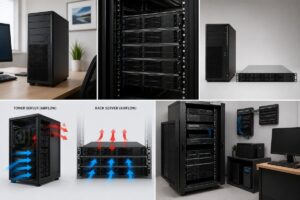
Server airflow is one of those things that often gets ignored until problems start showing up. When people think about server performance, they usually focus on processors, memory, or storage, but airflow quietly plays a big role behind the scenes. Good airflow keeps temperatures stable, reduces hardware stress, and helps everything run more smoothly over time. The idea behind Server Airflow Optimization Made Easy is not about making things complicated but about understanding how air moves through a system and how small adjustments can make a big difference. Even in a simple home server setup, poor airflow can lead to overheating, sudden shutdowns, or reduced performance during heavy use. On the other hand, a well-optimized airflow system helps components stay cool without needing extreme cooling solutions. This makes the entire system more reliable and longer-lasting. Once you understand the basics, airflow becomes less of a technical mystery and more of a practical habit that improves your server’s health naturally.
Understanding How Server Airflow Works in Simple Terms
To understand Server Airflow Optimization Made Easy, it helps to picture airflow like breathing. Servers take in cool air, pass it over hot components, and push warm air out. This constant movement keeps internal temperatures balanced. Most server cases are designed with intake fans at the front or bottom and exhaust fans at the back or top. This creates a natural direction for air to flow in one consistent path. When this flow is smooth, heat is removed efficiently, and components stay within safe operating temperatures. Problems begin when air gets trapped or moves in the wrong direction. Even small blockages can disrupt the balance and create hot spots inside the system. Dust buildup, poorly placed cables, or incorrect fan orientation can all interfere with airflow. Once you understand this simple movement of air, it becomes easier to spot what is going wrong in a server setup. Instead of guessing, you start thinking in terms of airflow direction, resistance, and heat removal.
Why Good Airflow Is Important for Server Stability
Good airflow is directly linked to how stable a server performs during long hours of operation. When temperatures rise too much, components naturally slow down to protect themselves. This can result in lag, delayed responses, or even unexpected restarts. Server Airflow Optimization Made Easy focuses on preventing these issues by ensuring that heat is continuously removed from the system. A stable airflow setup reduces thermal pressure on critical parts like the CPU, storage drives, and power supply. Over time, this also helps reduce wear and tear, which can extend the life of your hardware. Another important benefit is energy efficiency, as systems that stay cooler do not need fans to run at maximum speed all the time. This reduces noise and power usage as well. Many people only notice airflow when something goes wrong, but in reality, it is one of the most important foundations of server health. Keeping airflow consistent is a simple way to maintain long-term reliability without needing complex upgrades.
Common Airflow Problems Found in Server Setups
Many airflow issues in servers are caused by simple mistakes that are easy to overlook. One common problem is incorrect fan direction, where intake and exhaust fans work against each other instead of creating a smooth flow. Another issue is dust buildup, which slowly blocks air from passing through vents and cooling components. Over time, this can create hidden heat pockets inside the system. Poor cable placement is also a frequent cause of airflow restriction, as messy cables can block the path of moving air. In some cases, servers are placed in tight or enclosed spaces where air cannot circulate properly, which leads to heat buildup around the case. Server Airflow Optimization Made Easy is about identifying these small issues before they turn into bigger problems. Even something as simple as placing a server too close to a wall can reduce airflow efficiency. Once these common problems are understood, it becomes much easier to fix them with simple adjustments rather than expensive solutions.
Choosing the Right Server Layout for Better Air Movement
The physical layout of a server setup plays a major role in airflow performance. A well-planned layout allows air to move freely from intake points to exhaust points without unnecessary obstacles. Servers placed in open or well-ventilated areas generally perform better than those placed in closed cabinets without proper airflow design. Server Airflow Optimization Made Easy encourages thinking about space as part of the cooling system itself. When multiple servers are used, spacing between them becomes important so that hot air from one unit does not directly affect another. Vertical and horizontal positioning also matters, as it can influence how heat rises and escapes. Even rack-mounted systems depend heavily on correct placement to maintain smooth airflow channels. A good layout ensures that cool air enters easily, passes through components efficiently, and exits without recirculating inside the system. When layout is planned properly, the cooling system does not need to work as hard, which improves both performance and long-term stability.
How Cooling Components Work Together with Airflow
Cooling components like fans, heatsinks, and ventilation panels all work together as part of a single airflow system. Fans create movement, heatsinks absorb and transfer heat, and vents provide pathways for air to enter and exit. In Server Airflow Optimization Made Easy, it is important to understand that these components are not independent; they rely on each other to function properly. If one part is not working efficiently, the entire system can be affected. For example, even powerful fans cannot help much if air has no clear path to move through the case. Similarly, a good heatsink cannot perform well if hot air is trapped inside the system. The balance between intake and exhaust airflow is what keeps everything stable. When cooling components are aligned properly, they create a smooth cycle where heat is constantly removed and replaced with cooler air. This balance is what allows servers to run continuously without overheating or performance drops.
The Role of Cable Management in Airflow Efficiency
Cable management might seem like a small detail, but it has a big impact on airflow inside a server. When cables are messy or spread across airflow paths, they can block or slow down air movement. This creates resistance, which reduces the efficiency of cooling systems. Server Airflow Optimization Made Ease includes organizing cables in a way that keeps air pathways open and clear. Even simple adjustments like grouping cables together or routing them along the edges of a case can improve airflow significantly. Better cable management also helps in identifying hardware components more easily during maintenance, which saves time and reduces errors. In systems with high-density components, even a small obstruction can create heat buildup in specific areas. Keeping cables tidy ensures that air can move smoothly across all critical parts of the server. Over time, this leads to more stable temperatures and less strain on cooling fans, improving overall system reliability.
Monitoring Temperature and Airflow Behavior Over Time
Keeping an eye on temperature changes helps you understand how well your airflow system is performing. Servers often give indirect signals when airflow is not working efficiently, such as rising temperatures during normal workloads or fans running louder than usual. Server Airflow Optimization Made Easy includes observing these patterns and making small adjustments when needed. Consistent monitoring helps you notice problems early before they become serious. Temperature behavior can also change depending on workload, room conditions, and dust accumulation, so it is important to check regularly rather than assuming everything is fine. Over time, you start to recognize what normal performance looks like for your setup, which makes it easier to detect unusual changes. Good airflow should keep temperatures stable even during heavy use, without sudden spikes. When monitoring becomes a habit, maintaining server health becomes much easier and more predictable, helping prevent unexpected issues in the long run.
Simple Ways to Improve Server Airflow Without Complexity
Improving airflow does not always require technical upgrades or expensive equipment. In many cases, small adjustments can make a noticeable difference. Server Airflow Optimization Made Easy is about focusing on practical changes that improve air movement naturally. Ensuring that intake and exhaust fans are properly aligned is one of the simplest but most effective steps. Keeping the server in an open space with enough room around it also helps air circulate freely. Regular cleaning to remove dust from vents and fans supports better airflow over time. Organizing internal components and cables reduces blockage and allows air to move smoothly across hardware parts. Even adjusting the direction of airflow inside a room can contribute to better cooling conditions. The key idea is consistency rather than complexity. Small improvements made regularly often lead to better results than one-time major changes. With the right habits, airflow optimization becomes a natural part of maintaining a healthy server system.
FAQs
1. What is Server Airflow Optimization Made easy about what?
It is about understanding and improving how air moves inside a server system in a simple and practical way. The goal is to keep components cool, stable, and efficient by ensuring proper airflow without needing complex technical changes.
2. Why does server airflow matter so much?
Airflow is important because it directly affects temperature control. When airflow is poor, components can overheat, slow down, or become unstable. Good airflow helps maintain smooth performance and protects hardware from heat-related stress.
3. How can I tell if my server has airflow problems?
Common signs include rising temperatures, louder fan noise, or performance drops during normal use. If the server feels unusually hot or unstable, airflow may not be working efficiently.
4. Do I need expensive equipment to improve airflow?
No, most improvements come from simple changes like better cable management, cleaning dust, and ensuring fans are positioned correctly. These small adjustments can significantly improve airflow without extra cost.
5. How often should I check server airflow?
It is a good idea to check airflow and temperatures regularly, especially if the server runs continuously. Routine checks help catch small issues early before they turn into bigger problems.