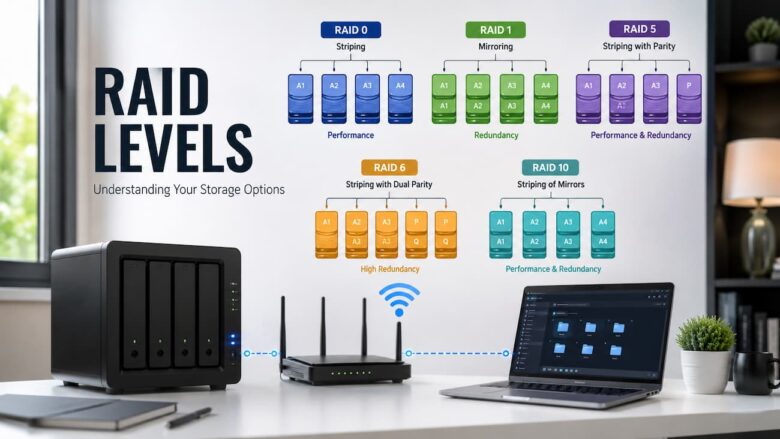
When you start setting up a Network Attached Storage (NAS) device, one of the first technical terms that you will probably hear is RAID. RAID can seem confusing at first, as it consists of many storage drives working together. But the underlying concept is basic. RAID is a method of configuring your storage drives to boost performance, increase data protection, or do a mix of the two depending on your needs.
For many first-time NAS customers, they only think about storage space, but choosing the correct RAID level is just as crucial. The RAID configuration you choose will affect how your files are kept, how much usable storage you will have, and the level of data protection you will have in the event of a drive failure. Knowing and understanding these differences before you set up your NAS will help you make better decisions and avoid unexpected issues later. post, we are going to describe, in clear and basic terms, the most common RAID levels used in NAS systems. If you are building a NAS for family photos, personal documents, media collections, or modest office data, this article will help you understand how each RAID level works and when it may be useful.
What is RAID?
RAID stands for Redundant Array of Independent Disks. It is a way of integrating two or more storage drives so that they work in unison as a single storage system. Depending on the RAID level you choose, the system can boost speed, protect data against disk failure, or provide a balance of both.
The NAS does not manage each drive individually but all mounted drives based on the set RAID configuration. This lets the system arrange data more efficiently, enabling varying degrees of redundancy and storage space. Just remember that RAID is NOT a substitute for regular backups; it’s a way to manage storage. Even with RAID protection, it is a good practice to have separate backups of important files.
Why RAID Matters For NAS Owners
A NAS is commonly used to store precious files that users want to preserve for many years. They may be family images, personal films, job documents, school projects, or business records. If a storage device fails unexpectedly, losing those files can be irritating, or even expensive.
RAID spreads data across numerous drives to decrease this danger. Some levels of RAID are geared for speed, while others allow you to access your data even if one of the drives dies. Deciding on the right RAID level before storing your files will enhance your NAS reliability and make it more suitable for your purposes.
How does RAID work?
RAID technology: the basic idea is simple, but the operations are complex. When you save data to the NAS, the drives in the RAID system determine how to distribute the information across the installed drives.
Some RAID levels spread the data across many disks to increase read and write performance. Other people make copies of your files so they are available if one drive fails. Some RAID levels use a combination of the two techniques to balance storage efficiency. performance and protection. Depending on the type of RAID you chose when you set up the NAS, it does different things.
Common RAID Levels Used in NAS Systems
Several RAID levels are available, but most home users and small offices only encounter a few of the most common configurations.
| RAID Level | Main Purpose | Data Protection |
|---|---|---|
| RAID 0 | Higher performance | No |
| RAID 1 | Data redundancy | Yes |
| RAID 5 | Balanced storage and protection | Yes |
| RAID 6 | Extra fault tolerance | Yes |
| RAID 10 | Performance with redundancy | Yes |
Each RAID level offers different advantages based on how you will use the NAS.
Understanding RAID 0
RAID 0 focuses on improving storage performance by spreading data across multiple drives. Because several drives work together at the same time, file transfers can be faster than using a single drive. However, RAID 0 provides no data protection. If one drive fails, all stored data may become inaccessible because every file is divided across multiple disks.
For this reason, RAID 0 is generally chosen only when speed is more important than protecting stored files. It is usually not considered the best option for storing important personal or business data.
- Improves read and write performance.
- Uses the full storage capacity of all installed drives.
- Provides no protection against drive failure.
- Best suited for situations where data can be easily replaced.
Understanding RAID 1
RAID 1 is one of the easiest RAID levels to understand because it creates an identical copy of your data on a second drive. This process is commonly known as mirroring. If one storage drive stops working, the second drive still contains the same files, allowing the NAS to continue operating while the failed drive is replaced.
The main trade-off is usable storage capacity. Since every file is written to two drives, only about half of the total installed storage is available for saving data. Many home users choose RAID 1 because it provides straightforward protection for important files while remaining simple to manage.
Understanding RAID 5
RAID 5 is one of the most popular RAID levels for home users and small offices because it offers a good balance between storage efficiency and data protection. Instead of simply copying data to another drive, RAID 5 distributes both data and parity information across multiple drives. Parity is additional information that allows the NAS to rebuild lost data if one drive fails. This means your files remain available while the failed drive can be replaced.
RAID 5 requires at least three storage drives to function. Because only part of the total storage is used for parity, it provides more usable space than RAID 1 while still offering protection against a single drive failure. Users often choose this RAID level when they need reliable storage without sacrificing too much capacity.
Understanding RAID 6
RAID 6 works similarly to RAID 5 but provides an additional level of protection. Instead of storing one set of parity information, RAID 6 stores two independent parity blocks across the drives.
This allows the NAS to continue operating even if two storage drives fail at the same time. Although this added protection reduces the amount of usable storage slightly, many users appreciate the extra reliability for important files. RAID 6 requires at least four storage drives and is often selected when long-term data protection is a higher priority than maximizing storage capacity.
- Protects against two simultaneous drive failures.
- Suitable for storing valuable or long-term data.
- Provides strong reliability.
- Requires more storage overhead than RAID 5.
Understanding RAID 10
RAID 10 combines the features of RAID 1 and RAID 0. It mirrors data for protection and distributes it across multiple drives to improve performance. This combination offers both speed and redundancy, making it an attractive option for users who frequently access or transfer large amounts of data. RAID 10 requires at least four storage drives because it creates mirrored pairs before combining them into one storage system.
Although it provides excellent performance and reliability, the usable storage capacity is lower because half of the installed storage is reserved for mirrored copies.
RAID Comparison Table
| RAID Level | Minimum Drives | Performance | Fault Tolerance | Storage Efficiency |
|---|---|---|---|---|
| RAID 0 | 2 | Excellent | None | Very High |
| RAID 1 | 2 | Good | One Drive | Lower |
| RAID 5 | 3 | Good | One Drive | High |
| RAID 6 | 4 | Good | Two Drives | Moderate |
| RAID 10 | 4 | Excellent | One Drive Per Mirror | Lower |
How to Choose the Right RAID Level
The best RAID level depends on how you plan to use your NAS. There is no single option that works perfectly for everyone. Instead, consider your storage priorities before making a decision. If your primary goal is protecting personal files, RAID levels that include redundancy may be more appropriate. If performance is your priority rather than data protection, a different RAID configuration may better suit your needs.
Ask yourself a few simple questions before choosing a RAID level:
- How important are my stored files?
- How much storage capacity do I expect to need?
- Will multiple people use the NAS at the same time?
- Do I want better performance, stronger protection, or a balance of both?
- How many storage drives will my NAS support?
Answering these questions makes it easier to select a RAID configuration that matches your long-term storage requirements.
Common Misunderstandings About RAID
Many new NAS customers think RAID protects them from all data loss, all the time. In practice, RAID protects against some types of hardware failure, depending on the RAID level. For example, RAID can’t rescue files that someone mistakenly destroys. It won’t save you from file corruption, infection, fire, theft, or anything else that could happen to the whole NAS.
Another widespread myth is that quicker RAID levels are always better. While increased performance can be advantageous, many home users benefit more from picking a RAID level that emphasizes data security over speed alone.
Why Backups Are Still Important
Even with a RAID setup that provides redundancy, you still need to back up regularly. RAID is also there to keep your NAS alive if a disk fails, but it’s not a replacement for a proper backup strategy.
It creates extra copies of essential files in a secondary location, adding another level of security against inadvertent deletion, hardware damage, or other unexpected events. Remember that RAID is about improving storage reliability, and backups are about making sure you can recover your vital information when you need it.
A Practical Example of RAID Level Choice
The best way to understand RAID is to use a real-life example. Think of a family who keeps vacation photos, home films, school projects, and crucial documents stored on a NAS. As these files are difficult or impossible to replace, their protection is more critical than the fastest feasible file transmission speeds.
Another is a small office with a NAS that holds spreadsheets, reports, presentations, and shared documents. The business needs reliable storage and consistent performance as employees access data throughout the day. In those cases it generally makes more sense to choose a RAID level that balances protection and storage efficiency rather than one that is optimized for speed alone. What you want to store, how many drives you have available, and how important your data is are always the determinants of the proper RAID level.
Advantages of Using RAID in a NAS
RAID offers several benefits that make a NAS more reliable and easier to manage. Although the exact advantages depend on the selected RAID level, users generally experience improvements in one or more of the following areas.
- Better protection against drive failure.
- Improved file availability.
- More efficient use of multiple storage drives.
- Higher performance with certain RAID levels.
- Greater flexibility for expanding storage over time.
- Reduced downtime when replacing a failed drive in supported RAID configurations.
These advantages explain why RAID has become a standard feature in many home and small business NAS systems.
Limitations of RAID
Although RAID provides many useful benefits, it also has limitations that users should understand before relying on it.
- RAID is not a substitute for regular backups.
- Some RAID levels reduce the amount of usable storage capacity.
- Rebuilding a RAID array after replacing a failed drive may take time.
- More advanced RAID levels require additional storage drives.
- Improper setup or accidental deletion can still result in data loss.
Knowing these limitations helps you build a more complete data protection strategy instead of depending entirely on RAID.
Tips for Managing RAID Successfully
When your NAS is up and running, there are a few simple things you can do to help maintain your RAID array humming along well for years to come.
- Regularly check the drive health using the NAS management interface.
- Replace failing drives as soon as you can.
- Please keep the NAS OS up to date.
- Monitor the free storage space from time to time.
- Do not power-off NAS inappropriately while writing data.
- Back up crucial files regularly to another location.
These practices assist in ensuring that storage performance remains consistent over time and limit the chance of unforeseen difficulties.
Conclusions
One of the key features that allows NAS customers to configure their storage disks to provide greater performance, better reliability, or a combination of the two is RAID. Each level of RAID is intended for a distinct purpose. RAID 0 is all about speed, RAID 1 is simple data mirroring, RAID 5 strikes a balance between storage efficiency and protection, RAID 6 adds more fault tolerance, and RAID 10 is high performance with redundancy.
Your choice of RAID level relies on your storage needs, number of disks, and importance of your data. Knowing the pros and cons of each RAID configuration will help you construct a NAS that meets your future needs and minimizes the risk of data loss.
FAQs
1. What does RAID mean?
RAID is an acronym for Redundant Array of Independent Disks. It’s a way to combine several storage drives into a single storage system to achieve better speed, data protection, or both.
2. What is the easiest RAID level for a beginner?
RAID 1 is commonly thought of as one of the easiest RAID levels to grasp. It keeps identical copies of data on two drives, which makes it simple to maintain and offers minimal protection against a single drive failure.
3. Does RAID replace backups?
No. RAID improves the stability of the storage, but it does not protect against unintentional deletions, viruses, theft, or physical damage to the NAS. Regular backups continue to be a key component of securing vital files.
4. Can I adjust the RAID level after it’s been set up?
Changing RAID configurations is possible with some NAS devices, but the process varies depending on the device and how your storage is set up. However, changing RAID levels sometimes needs careful preparation and may entail transferring or backing up data first.
5. What is the ideal RAID level balance for most NAS users?
RAID 5 is a popular choice for many users since it offers a good compromise between usable storage capacity, performance, and protection from a single drive failure. But the most appropriate RAID level always depends on the specific storage needs.