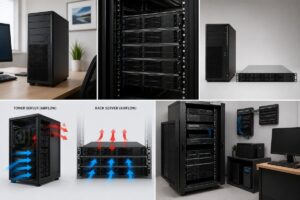
What Is a Home Server?
A home server is a computer that provides services to other devices connected to your home network. Instead of handling everyday activities like web browsing or gaming, it focuses on storing data, managing files, and supporting network services.
The server communicates with laptops, desktop computers, smartphones, tablets, and other connected devices. Whenever a user requests a file or accesses shared content, the server responds by delivering the requested information through the local network. Unlike cloud storage, a home server keeps your files within your own home. This lets you organize and manage your digital content while you keep direct control over where you store it.
How Does a Home Server Work?
A home server connects directly to your router using a network cable. Once connected, every authorized device on the same network can communicate with it. When someone saves a document, uploads family photos, or opens a shared folder, the information is stored on the server instead of remaining on just one computer. Other authorized devices can then access the same files whenever needed.
The server continuously listens for requests from connected devices and provides access according to the permissions that have been configured.
| Component | Role |
|---|---|
| Home Server | Stores and manages shared data. |
| Router | Connects the server with all devices. |
| Computers | Access and manage stored files. |
| Smartphones & Tablets | View or upload files through the network. |
| Smart TV | Access shared media files if supported. |
Common Uses of a Home Server
One of the biggest advantages of building a home server is its flexibility. It can perform many useful tasks depending on your household’s needs.
Some of the most common uses include:
- Centralized file storage
- Automatic computer backups
- Photo and video organization
- Document sharing between family members
- Personal media storage
- Home network file management
- Data archiving
Many people begin with a single purpose, such as backing up family photos, and gradually expand how they use the server over time.
Benefits of Building a Home Server
A home server offers several practical advantages that make everyday digital life easier. Instead of keeping files scattered across multiple devices, everything can be organized in one central location.
- Easy access to files from different devices.
- Better organization of documents and media.
- Convenient automatic backups.
- Simplified file sharing within the home.
- Greater control over personal data.
- Reduced dependence on external storage devices.
For example, if family photos are stored on a home server, everyone in the household can view them from their own device without creating multiple copies.
Who Should Consider Building a Home Server?
A home server is suitable for many different types of users. You do not need to be an IT professional to benefit from one. A family may use it to store thousands of photos and videos in one organized place. Students can keep assignments and research files safely backed up. People working from home often appreciate centralized document storage that they can easily access from multiple computers. Even individuals who simply want a better way to organize digital files can consider a home server useful.
Home Server vs External Hard Drive
Many people wonder whether a home server is simply another type of external storage drive. While both store files, they serve different purposes.
| Feature | Home Server | External Hard Drive |
|---|---|---|
| Network Access | Available to multiple devices. | Usually connected to one device. |
| Automatic Backups | Often supported. | Usually manual. |
| File Sharing | Easy across the network. | Limited. |
| Availability | Can remain online continuously. | Only when connected. |
This difference makes a home server much more suitable for households with multiple users and devices.
Basic Hardware Needed for a Home Server
One of the biggest misconceptions about home servers is that they require expensive or highly specialized hardware. In reality, the hardware requirements depend on how you plan to use the server. For basic file storage and backups, the requirements are usually quite modest.
A typical home server includes a processor, memory (RAM), storage drives, a stable power supply, and a network connection. Each component contributes to the overall performance and reliability of the system.
| Hardware | Purpose |
|---|---|
| Processor (CPU) | Handles system tasks and user requests. |
| Memory (RAM) | Supports smooth multitasking. |
| Storage Drives | Store files, backups, and shared data. |
| Network Port | Connects the server to the home network. |
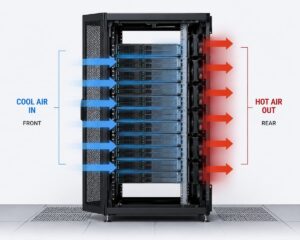
| Cooling System | Keeps hardware operating at safe temperatures. |
Choosing hardware that matches your expected workload helps ensure that the server performs reliably without unnecessary upgrades.
Choose the Right Location
The location of your home server affects both its performance and lifespan. Since many servers operate continuously, they should be placed in a clean, dry, and well-ventilated area.
Avoid placing the server near direct sunlight, heaters, or areas with excessive dust. Adequate airflow allows the cooling system to work efficiently and helps maintain stable operating temperatures. Many homeowners place the server on a sturdy shelf close to the network router, making cable management easier while maintaining a reliable network connection.
Network Requirements for a Reliable Connection
A home server depends on your local network to communicate with other devices. A stable network connection allows computers, smartphones, tablets, and smart TVs to access shared files quickly and consistently.
Although wireless connections are convenient for many devices, connecting the server itself to the router with an Ethernet cable generally provides the best reliability and transfer speeds. If several people regularly use the server at the same time, a stable wired connection helps maintain smooth performance.
Keep Security in Mind from the Start
Even though a home server is inside your house, you should still protect it with good security practices. Simple precautions can prevent accidental file loss and unauthorized access.
Use strong passwords for all user accounts and avoid sharing administrator credentials unnecessarily. Create separate accounts for different users instead of allowing everyone to use the same login information. It is also a wise idea to review user permissions occasionally to ensure that sensitive folders remain accessible only to authorized users.
Examples of How Families Use Home Servers
Every household has different storage needs, which is one reason home servers have become increasingly popular. Their flexibility allows them to adapt to many situations.
- A family stores years of photos and videos in one organized location.
- A student keeps assignments and research files backed up automatically.
- A remote worker shares important documents between multiple computers.
- A household maintains one central location for important records and digital documents.
These everyday examples demonstrate that anyone can benefit from a home server, not just technology enthusiasts. It can be a practical solution for anyone who wants better organization and easier access to personal files.
Simple Maintenance Tips
A home server requires very little maintenance, but regular care helps it operate efficiently for many years. Since it often runs continuously, occasional checks are recommended to ensure everything is functioning properly.
Keep the server clean by removing dust from the ventilation openings, monitor available storage space, and install software updates whenever they become available. It is also advisable to review backup jobs occasionally to confirm that important files copy successfully.
Spending just a few minutes each month on maintenance can improve reliability and reduce the chances of unexpected issues.
Advantages and Limitations of a Home Server
Like any technology, a home server has both strengths and limitations. Understanding both sides helps you decide whether it fits your needs.
| Advantages | Limitations |
|---|---|
| Centralized file storage | Requires initial setup and configuration. |
| Easy file sharing between devices | Needs regular maintenance. |
| Supports automatic backups | Consumes electricity while operating. |
| Better organization of digital files | Storage capacity must be planned. |
| Greater control over personal data | Basic networking knowledge is helpful. |
For most households, the advantages of improved organization and convenient access to files outweigh the small amount of maintenance required.
Tips for Getting the Most from Your Home Server
Once your home server is running, developing good habits will help you use it effectively.
- Create clearly named folders for different categories of files.
- Remove duplicate or unnecessary files regularly.
- Schedule automatic backups whenever possible.
- Check available storage space every few months.
- Review user permissions as your household’s needs change.
- Keep both hardware and software in optimal condition.
These simple practices make the server easier to manage and improve its long-term usefulness.
Conclusion
A home server is a special-purpose PC that you can use to store data and deliver other network services to devices attached to your home network. It is a practical approach to consolidate information, make backups easier, and organize digital content in one place. Unlike external storage devices, which usually link to a single computer, a home server provides shared data access to several authorized devices as needed.
You don’t need to be a tech genius to build a home server. You can build a robust system that will serve your household for years with the right hardware, anticipating your storage needs, a solid network connection, and following basic security procedures. Home servers are an inexpensive and versatile way to handle family photos, store crucial documents, and back up several machines.
FAQs
1. What is the main goal of a home server?
A home server is a device that stores, maintains, and shares files between various devices on the same home network. It also facilitates operations like automatic backups and centralized file organization.
2. Do I have to be a computer genius to set up a home server?
No. Many beginners build home servers by following step-by-step instructions and learning the basic concepts of networking and storage.
3. Can more than one person use the same home server?
Yes. A home server can accommodate several user accounts, enabling family members or household users to access shared folders while keeping personal files private.
4. Does a home server only work for big families?
No. Even if you are the only user, a central place for documents, backups, images, and other vital items can be useful.
5. How often should a home server be serviced
Basic routine maintenance like monitoring storage space, implementing updates, and clearing dust from ventilation regions keeps the server running smoothly.