Understanding a NAS System
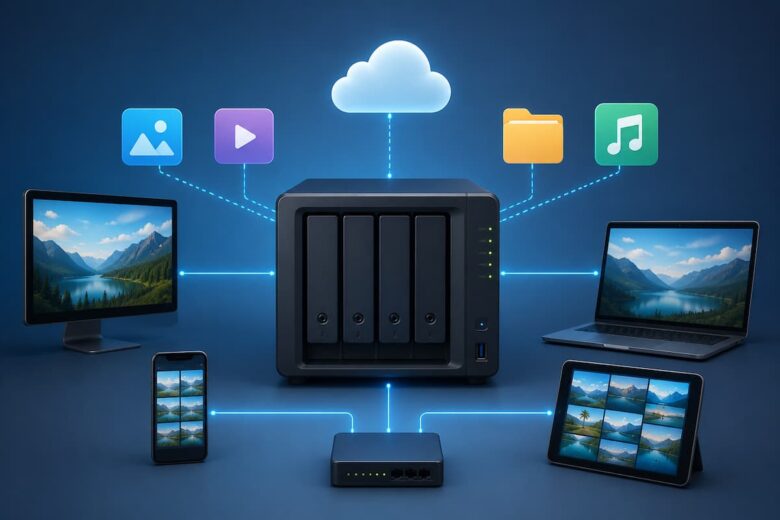
NAS stands for Network Attached Storage. It is a dedicated storage device that connects directly to your local network instead of being plugged into a single computer. Unlike an external hard drive, which usually works with one device at a time, a NAS system allows multiple computers, smartphones, tablets, and even smart TVs to access the same files simultaneously. Think of it as your own private cloud. Instead of uploading files to an online service, everything remains stored on hardware that you control inside your home or workplace.
A NAS system stays connected to your network all the time, making your files available whenever authorised users need them without moving storage devices between computers.
How Does a NAS System Work?
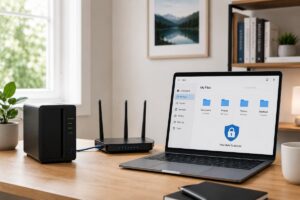
A NAS device connects to your router using an Ethernet cable. Once connected, every approved device on the same network can access its storage. The NAS contains one or more hard drives or SSDs managed by its own operating system. This operating system handles file sharing, user accounts, permissions, backups, and storage management. When someone saves a document, uploads photos, or streams a video, the files are stored directly on the NAS instead of remaining on an individual computer.
| Device | Role |
|---|---|
| Router | Connects the NAS to your network. |
| NAS Device | Stores and manages all files. |
| Computers & Phones | Access, upload, and download files. |
| Users | Share data securely using personal accounts. |
Why More People Are Using NAS Systems
As digital content continues to increase, many households and businesses struggle to keep everything organised. Photos, videos, work documents, school assignments, and backups quickly consume the available storage on laptops and mobile devices. A NAS system solves this problem by providing one central location for storing everything. Instead of searching through different computers or external drives, users can easily locate files from a single storage system. This centralised approach also makes collaboration much easier because everyone works with the latest version of shared files.
A family can store vacation photos, important documents, and videos on one NAS system so every member has access without creating multiple copies on different devices.
Main Benefits of a NAS System
- Centralised file storage for all devices.
- Easy sharing between family members or coworkers.
- Automatic backups reduce the risk of data loss.
- Expandable storage as your needs grow.
- Access files from different devices on the same network.
- Better organisation compared to multiple external drives.
- User permissions help keep sensitive information secure.
NAS vs External Hard Drive
Many people wonder whether an external hard drive is enough. While external drives are useful for simple storage, they have limitations compared to NAS systems.
| Feature | NAS System | External Hard Drive |
|---|---|---|
| Network Access | Yes | No |
| Multiple Users | Yes | Usually no. |
| Automatic Backup | Supported | Limited |
| Storage Expansion | Easy | Limited |
| Sharing Files | Simple | Manual |
Who Can Benefit From a NAS System?
A NAS system is useful for many different types of users. Students can keep assignments and study materials organised. Families can safely store photos and videos collected over many years. Small businesses can create a shared workspace where employees easily access documents without emailing multiple copies. Creative professionals working with large image or video files also appreciate having a centralised storage location that remains available across several devices.
Common Uses of a NAS System
One of the biggest strengths of a NAS system is its flexibility. It is much more than a simple file storage device. Many people start using it to store documents but soon discover that it can become the centre of their digital life. Whether you work from home, study online, or simply want to keep your personal files organised, a NAS can support a variety of everyday tasks.
- Store family photos and videos in one secure location.
- Keep important work documents organised.
- Automatically back up computers and mobile devices.
- Share files with family members or colleagues.
- Store music, movies, and other media files.
- Create a personal archive for old documents and memories.
- Access files from multiple computers on the same network.
Many people begin with a NAS to back up one computer but later use it as the central storage location for every digital device in their home.
How a NAS Helps Protect Your Data
Data loss can happen unexpectedly. Hard drives wear out over time, laptops can be damaged, and accidental deletion is more common than many people realise. Losing years of photos, important documents, or work files can be frustrating. A NAS system helps reduce these risks by making regular backups much easier. Instead of remembering to copy files manually every week, many NAS systems can automatically save updated versions of your files. This means your latest documents are protected without requiring constant attention. Some NAS systems also support multiple storage drives that can work together. If one drive develops a problem, your data may still remain available on another drive, providing an extra layer of protection against hardware failure.
Keeping Files Organized Becomes Easier
As digital files accumulate over the years, finding a specific document or photo often becomes difficult. Files may be scattered across laptops, USB drives, old computers, and cloud accounts. A NAS system brings everything together in one organised location. You can create folders for different projects, family members, years, or categories. Since everyone accesses the same storage location, there is less confusion about which file is the newest version. This simple organisation saves time and reduces unnecessary duplication.
Accessing Files Across Multiple Devices
Modern households often use several devices every day. You may start working on a desktop computer, continue on a laptop, and later view the same file on a tablet. A NAS system allows these devices to access the same stored data without constantly copying files between them. This convenience also helps families who share photos, videos, school assignments, or household documents. Instead of sending files through email or messaging apps, everyone can simply access the shared folder when needed.
| Situation | How NAS Helps |
|---|---|
| Working on multiple computers | Provides one central version of every file. |
| Family photo collection | Stores all memories in one organised library. |
| Student assignments | Keeps coursework available from different devices. |
| Office teamwork | Allows employees to work from shared files. |
Can a NAS Replace Cloud Storage?
Many people compare a NAS system with cloud storage because both allow users to store digital files. However, they are designed differently. A NAS stores data on hardware that you own and control, while cloud storage keeps files on remote servers managed by another company.
For users who prefer keeping their files within their own home or office network, a NAS offers greater control over storage and organisation. It also removes the need to upload every file to an external service before accessing it. Some people choose to use both solutions together. They keep frequently used files on their NAS while maintaining additional backups elsewhere. This balanced approach provides convenience while improving overall data protection.
Things to Consider Before Choosing a NAS System
Before setting up a NAS, think about how much storage you currently use and how your needs may grow in the future. Photos and documents require relatively little space, while large video collections consume much more storage. You should also consider how many people will access the system and whether automatic backups are important for your daily routine. Planning these details early helps create a storage solution that continues meeting your needs for many years.
Organise folders with clear names such as Work, Family Photos, School, and Important Documents. A simple folder structure makes finding files much faster as your storage grows.
Simple Tips for Managing a NAS System
Setting up a NAS system is only the beginning. Good file management helps keep your storage organised and easy to use over time. Spending a few minutes creating a logical folder structure can save hours of searching later. It is also helpful to remove duplicate files occasionally and archive older data that you no longer use every day.
Another good habit is to review your storage space every few months. This allows you to identify large files, delete unnecessary content, and plan for future storage needs before running out of space.
- Create folders with clear and descriptive names.
- Keep work and personal files in separate directories.
- Delete duplicate or outdated files regularly.
- Schedule automatic backups whenever possible.
- Review storage usage every few months.
- Limit access to sensitive folders when sharing files.
Common Misconceptions About NAS Systems
Many people assume that NAS systems are designed only for large companies or technology professionals. In reality, modern NAS devices are much easier to use than they were years ago. Most include user-friendly setup guides and web-based management tools that simplify everyday tasks.
Another common misconception is that a NAS completely eliminates the need for backups. While it improves data protection, no storage system is completely immune to accidents or unexpected failures. Maintaining additional backups remains a good long-term practice. Some users also believe a NAS requires constant maintenance. In most cases, once the initial setup is complete, routine management involves only occasional software updates, storage checks, and backup reviews.
Advantages and Limitations at a Glance
| Advantages | Limitations |
|---|---|
| Central location for all files. | Requires an initial setup process. |
| Supports multiple users. | Needs a stable local network. |
| Simplifies backups. | Storage capacity should be planned in advance. |
| Keeps files organised. | Occasional maintenance is recommended. |
| Easy file sharing within a network. | Additional backups are still a good idea. |
Key Takeaways
- A NAS system is a storage device connected directly to your network.
- It allows multiple devices to access the same files from one location.
- Automatic backups help reduce the risk of losing important data.
- It keeps documents, photos, videos, and other files well organised.
- NAS systems are useful for families, students, remote workers, and small businesses.
- Good organisation and regular backups help maximise its benefits.
Conclusion
A Network Attached Storage (NAS) system is much more than a place to save files. It creates a centralised digital workspace where documents, photos, videos, and other important data remain organised and accessible across multiple devices. Whether you want to simplify file sharing, improve data protection, or reduce the clutter caused by scattered storage devices, a NAS offers a practical long-term solution.
While setting up a NAS requires a little planning, the benefits often outweigh the effort. Better organisation, convenient access, and easier backups make it a valuable addition to many homes and workplaces. As your digital collection continues to grow, having a reliable storage system can help keep your files safe, organised, and readily available whenever you need them.
FAQs
1. What does NAS stand for?
NAS stands for Network Attached Storage. It is a storage device connected to a local network that allows multiple users and devices to access shared files.
2. Is a NAS system only for businesses?
No. Families, students, photographers, remote workers, and home users can all benefit from a NAS system for organising and protecting their files.
3. Can I use a NAS for photo and video storage?
Yes. Many people use NAS systems to store large collections of photos, videos, and personal memories in one centralised location.
4. Does a NAS replace backups?
No. A NAS improves data management and protection, but maintaining additional backups is still considered a good practice for important files.
5. Can multiple people use the same NAS?
Yes. One of the main advantages of a NAS system is that multiple users can securely access shared folders from different devices on the same network.
References
- National Institute of Standards and Technology (NIST) – Digital Data Management Best Practices
- Computer Networking Fundamentals and Storage Concepts
- General File Backup and Data Protection Guidelines
- Industry documentation on Network Attached Storage (NAS) technology